the binary is a new build of the player and not the server….please fix it 🙂
Administrator
Nope, the server is included in the source tarball.
catsoul
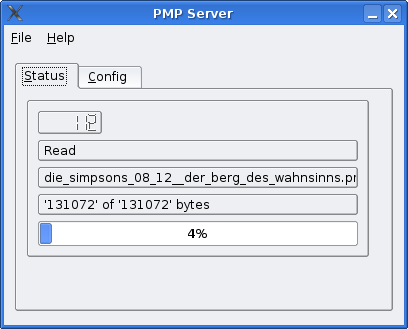
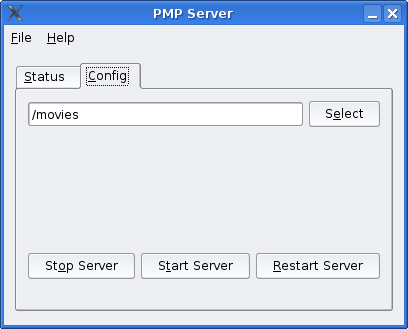
but how to get the gui working? i see there just the pmp_server.py and it doesnt start 🙁
Administrator
You need Qt and PyQt packages installed. Shouldn’t be a problem on any common linux distro, to pull these packages. Windows user need to get Qt eval from Trolltech website and also need PyQt Windows installer from Riverbank Software.
Venin
Any more info for us windows users. How to run the server when having Qt eval and PyQT? Isnt there some easier way to stream from windows? Possible to use VLC?
Djakku
can’t use vlc, it doesn’t support pmp encapsulation
vibez
I think we need a little tutorial for us windows guys who are gaving a hard time getting the GUI server to run
Djakku
besides the gui, are there any modifications made to the the code? I mean have it been optimized or it’s just that a GUI has been added?
Giskard2k4
Downloaded & installed the Qt (v4.1.1.) and PyQt packages. When attempting to run the “pmp_server.py” it is requesting “qt-mteval335.dll” – the only version for Dload for windows is v4.1.1. & cannot find version 3.3.5 for windows.
Any suggestions?
Venin
Ive digged up a bit info on this. U dont need that stuff really, check out http://www.dcemu.co.uk/vbulletin/showthread.php?t=18902 . Its a good guide there. All u need is python, and theres a link for a good one there too.
Venin
And another thing, I forgot.. the new server doesnt work.. im too lazy to get u the error message, but i downloaded an older version of the pmp_server.py .. (from this site) .. then after i edited the folder for movies in the file, i just double-click and it works perfectly. Doesnt have a nice gui .. but wth :p
Giskard2k4
Hey Venin…too lazy to figure out this is old news…..we know this already…The GUI is a step FORWARD….try & keep up.
Venin
Not everyone knew this, thats why i posted, if u already know it dont read it..
Me
Nice job, works great!
[OFFTOPIC]
Any recomendation to convert avi files to pmp under linux?
Only 1 thing more, Ive done the conversion and also the mux correctly as you said but the psp_mod is unable to read the file like i had not done it correctly.
Are u sure these are the correct conversion instructions?
Administrator
Yes, it should work. Did you use my python script for the conversion ?
Me
I cant use it cause when it finishes the conversion it tries to mount my psp, it fails and i lose all conversion. :S
I dont want to mount my psp or save the file inside it, i only want to convert the file. :S
Administrator
You have to leave out the -c switch which does an cleanup in the target psp dir.
But the scripts always wants to copy the resulting files to the psp. I should add an ‘nocopy’ flag to that tool…
Me
Ive realized that it delete my original avi file and remplace it with the muxed one O_o (I lost my original avi :O), also Id be nice to have the possibility to convert the file with lower frames or something like that, i cant watch it propertly with my home wireless.
vibez
admin,
any chance of writing a little guide on how to get the python server gui running?
Pete
I know this isn’t anything to do with the GUI, but is it possible to get the server to encode video on the fly? Although it wouldn’t be hard to batch convert them all, having to convert them is a drag.
So, is there any way to make the server encode the video into the .pmp format while the psp is watching?
a desprate psp owner
Well.. I cant download it.. I get a error 404 so im skrewed
Administrator
fixed the dl link.
Brad
It keeps getting stuck on 2 out of 4 on the connection part when i use a static connection and 3 out of 4 when i don’t. It does this every time. Any ideas on how to fix this? Im running Custom Firmware 4.01 M33-2
Gaz
I can run the server script fine on Windows with but when I try on Linux ubuntu I get import errors anyone got any pointers?
the binary is a new build of the player and not the server….please fix it 🙂
Nope, the server is included in the source tarball.
but how to get the gui working? i see there just the pmp_server.py and it doesnt start 🙁
You need Qt and PyQt packages installed. Shouldn’t be a problem on any common linux distro, to pull these packages. Windows user need to get Qt eval from Trolltech website and also need PyQt Windows installer from Riverbank Software.
Any more info for us windows users. How to run the server when having Qt eval and PyQT? Isnt there some easier way to stream from windows? Possible to use VLC?
can’t use vlc, it doesn’t support pmp encapsulation
I think we need a little tutorial for us windows guys who are gaving a hard time getting the GUI server to run
besides the gui, are there any modifications made to the the code? I mean have it been optimized or it’s just that a GUI has been added?
Downloaded & installed the Qt (v4.1.1.) and PyQt packages. When attempting to run the “pmp_server.py” it is requesting “qt-mteval335.dll” – the only version for Dload for windows is v4.1.1. & cannot find version 3.3.5 for windows.
Any suggestions?
Ive digged up a bit info on this. U dont need that stuff really, check out http://www.dcemu.co.uk/vbulletin/showthread.php?t=18902 . Its a good guide there. All u need is python, and theres a link for a good one there too.
And another thing, I forgot.. the new server doesnt work.. im too lazy to get u the error message, but i downloaded an older version of the pmp_server.py .. (from this site) .. then after i edited the folder for movies in the file, i just double-click and it works perfectly. Doesnt have a nice gui .. but wth :p
Hey Venin…too lazy to figure out this is old news…..we know this already…The GUI is a step FORWARD….try & keep up.
Not everyone knew this, thats why i posted, if u already know it dont read it..
Nice job, works great!
[OFFTOPIC]
Any recomendation to convert avi files to pmp under linux?
I can only find windows converters… 🙁
[/OFFTOPIC]
Yeah, you can use ffmpeg.
ffmpeg -y -i  in.avi -s 480x272 -r 25 -b 768  -an  -vcodec "xvid"  out.avi

ffmpeg -y -i in.avi -acodec "mp3" -ab 128 -ar 44100 -vn out.mp3

perl pmp_muxer.pl   out.avi out.mp3  output.pmp
Oh! Nice, Ive tried before but my problem was that the ffmpeg ubuntu package didnt support xvid, ive installed the newer version and everything OK.
Would be nice a frontend to do this for beginer users. 😛
yes, but aleast a made a wrapper script for it which can handle mp4 und pmp encoding.
https://optixx.org/2006/01/22/psp-video-encoder-with-pmp-support/
Only 1 thing more, Ive done the conversion and also the mux correctly as you said but the psp_mod is unable to read the file like i had not done it correctly.
Are u sure these are the correct conversion instructions?
Yes, it should work. Did you use my python script for the conversion ?
I cant use it cause when it finishes the conversion it tries to mount my psp, it fails and i lose all conversion. :S
I dont want to mount my psp or save the file inside it, i only want to convert the file. :S
You have to leave out the -c switch which does an cleanup in the target psp dir.
But the scripts always wants to copy the resulting files to the psp. I should add an ‘nocopy’ flag to that tool…
Ive realized that it delete my original avi file and remplace it with the muxed one O_o (I lost my original avi :O), also Id be nice to have the possibility to convert the file with lower frames or something like that, i cant watch it propertly with my home wireless.
admin,
any chance of writing a little guide on how to get the python server gui running?
I know this isn’t anything to do with the GUI, but is it possible to get the server to encode video on the fly? Although it wouldn’t be hard to batch convert them all, having to convert them is a drag.
So, is there any way to make the server encode the video into the .pmp format while the psp is watching?
Well.. I cant download it.. I get a error 404 so im skrewed
fixed the dl link.
It keeps getting stuck on 2 out of 4 on the connection part when i use a static connection and 3 out of 4 when i don’t. It does this every time. Any ideas on how to fix this? Im running Custom Firmware 4.01 M33-2
I can run the server script fine on Windows with but when I try on Linux ubuntu I get import errors anyone got any pointers?